
Text-message permission and opt-outs
What the opt-in badge means, how to ask a customer for permission, and what happens when someone texts STOP.
Texting a customer who never agreed to be texted is against the law in the United States, and the penalties land on the dealership. Every contact record carries a small set of switches that decide what the app will and will not send. They are worth understanding before you touch them.
What the badge means
Each row in the contact list carries one of three pills, and the same status appears at the top of the record under Opt-in.
| Badge | What it means |
|---|---|
| Opted in (green) | The customer ticked a consent box on your website or in a form during a chat. They can be included in a text campaign. |
| Not opted in (grey) | Nobody has recorded their consent yet. You can still answer them in an open conversation; you cannot include them in a text campaign. |
| Opt-out (red) | They told you to stop. Nothing goes out to them at all — not a campaign, not a reply. |
Replying to a customer who texted you first is a different matter from marketing to them. Someone who texts your dealership’s number has effectively asked you to reply, so the app lets you answer them even though the badge is grey.
Ask a customer for permission
When a contact is grey, a Request button sits next to the Not Opted In pill.
- Open the contact from the Contacts page.
- In the Opt-in section, choose Request.
- The customer gets a text that reads: Hi Dave, Demo Motors would like to send you text updates. Reply YES to opt in. Reply STOP to opt out. Msg & data rates may apply.
Underneath the button you get Request sent. The record then shows Requested Mar 3, 2026 so the next person can see it has already been asked.
Nothing goes out to a contact with no phone number on file. In that case the app says Recorded (SMS not configured) — add a number and ask again.
Check the badge before you choose Request. The button doesn’t stop you, and it doesn’t warn you, so it will happily text an invitation to someone who already told you to stop. Look for the red Opt-out pill first, and leave those people alone.
What happens when a customer texts back
The app reads the whole message, so a customer writing “I stopped by yesterday” is safe. Only a message that is nothing but the keyword counts, in any mix of upper and lower case.
STOP, STOPALL, UNSUBSCRIBE, CANCEL, END or QUIT:
- Text Opt-Out switches on and Text Allowed switches off, so nothing more can be sent to them.
- They get one last text back: You have successfully been unsubscribed from Demo Motors messages. You will not receive any more messages from this number. Reply START to resubscribe.
- Their message and that reply both appear in the conversation, so you can see it happened.
START, YES or UNSTOP:
- Text Opt-Out switches off and Text Allowed switches back on.
- They get You have successfully been resubscribed to messages from Demo Motors.
That confirmation is sent whatever the switches say — it is the one message an opted-out customer is meant to receive.
Any other word, HELP included, is treated as an ordinary message. It reaches your inbox and waits for a person to answer it.
The switches
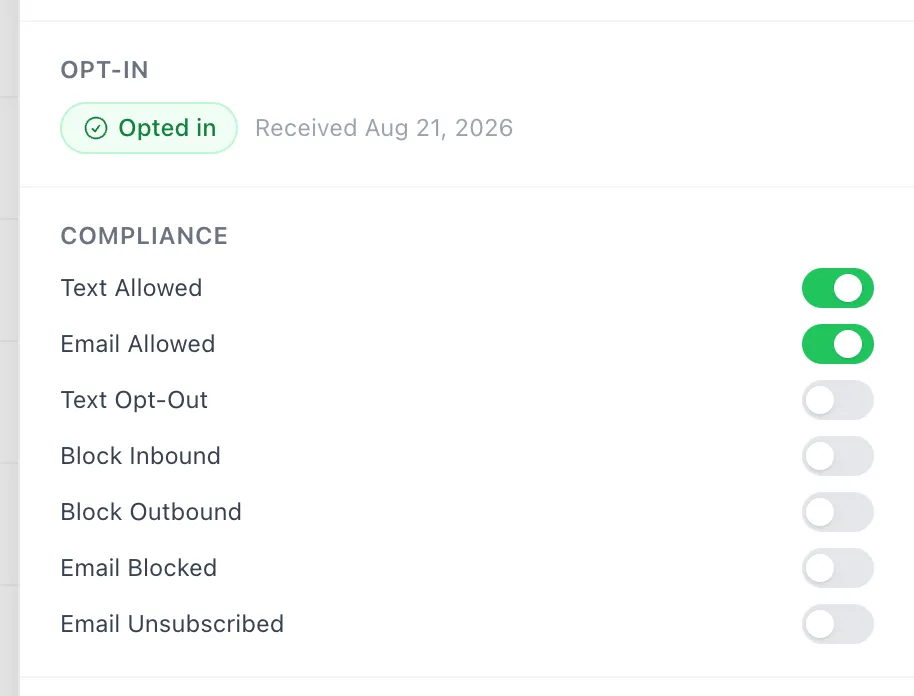
The Compliance section of a contact’s record holds seven switches. Each one takes effect the moment you flip it; there is no save step, no confirmation and no undo. Everyone on the team can change them, not just managers, so treat them as shared settings — the agent who picks up this customer next lives with whatever you leave behind.
| Switch | On means |
|---|---|
| Text Allowed | Texts can go to this person. Turning it off stops all of them. |
| Email Allowed | Emails can go to this person. |
| Text Opt-Out | They have asked not to be texted. Set on its own by a STOP text. |
| Block Inbound | Anything they send is thrown away — it never reaches your inbox. |
| Block Outbound | Nothing at all can be sent to them, whatever the other switches say. |
| Email Blocked | Their email address is unusable, usually because mail keeps bouncing. |
| Email Unsubscribed | They unsubscribed from your emails. |
Four things stop a text from going out: no phone number, Text Allowed off, Text Opt-Out on, or Block Outbound on. Any one of them is enough. If a reply of yours seems not to have reached a customer, this section is the first place to look.
There is one more reason, and it is not a fault. In a conversation that started on your website, your replies appear in the customer’s browser window and are only texted to them once they have closed it. Somebody sitting in front of the chat gets your answer on screen instead of on their phone.
Turning Text Opt-Out back off by hand undoes a customer’s own request. Only do it when the customer has asked you to, in front of you or in writing. Your name is recorded against the change.
Good to know
- A customer replying YES gets texting turned back on for them, but the badge stays grey. The green Opted in badge only comes from a consent box ticked on your website or in a form during a chat, and there is no way to set it by hand. Someone who agreed by text will not appear in the Text Marketing Opt In segment.
- Block Inbound is heavier than it looks. A blocked customer’s texts vanish with no reply and no record in the inbox, so nobody knows they tried. Use it for genuine abuse, not for a customer who is being difficult.
- Every consent change is kept, with the date, the wording the customer agreed to, and whether it came from a website tick box, a STOP text or a member of staff. That record is what protects the dealership if a customer ever disputes being texted. There is no screen showing it yet — if you ever need it for a complaint, ask PixelMotion to pull it out.
- The same Opt-in and Compliance controls are on the panel to the right of any conversation, under Opt-in & Compliance.